
Display Discount Percentage Badge on Sale Products
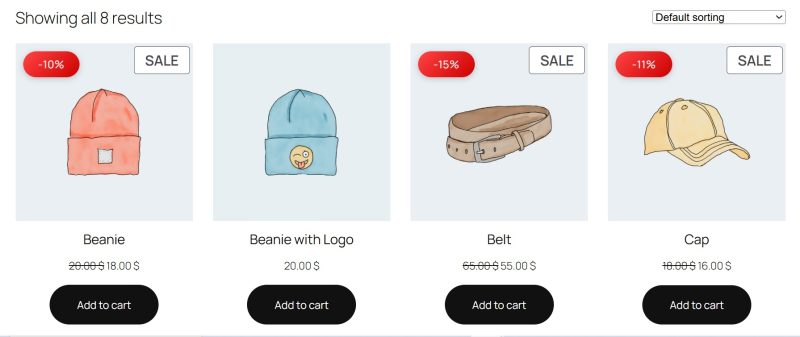
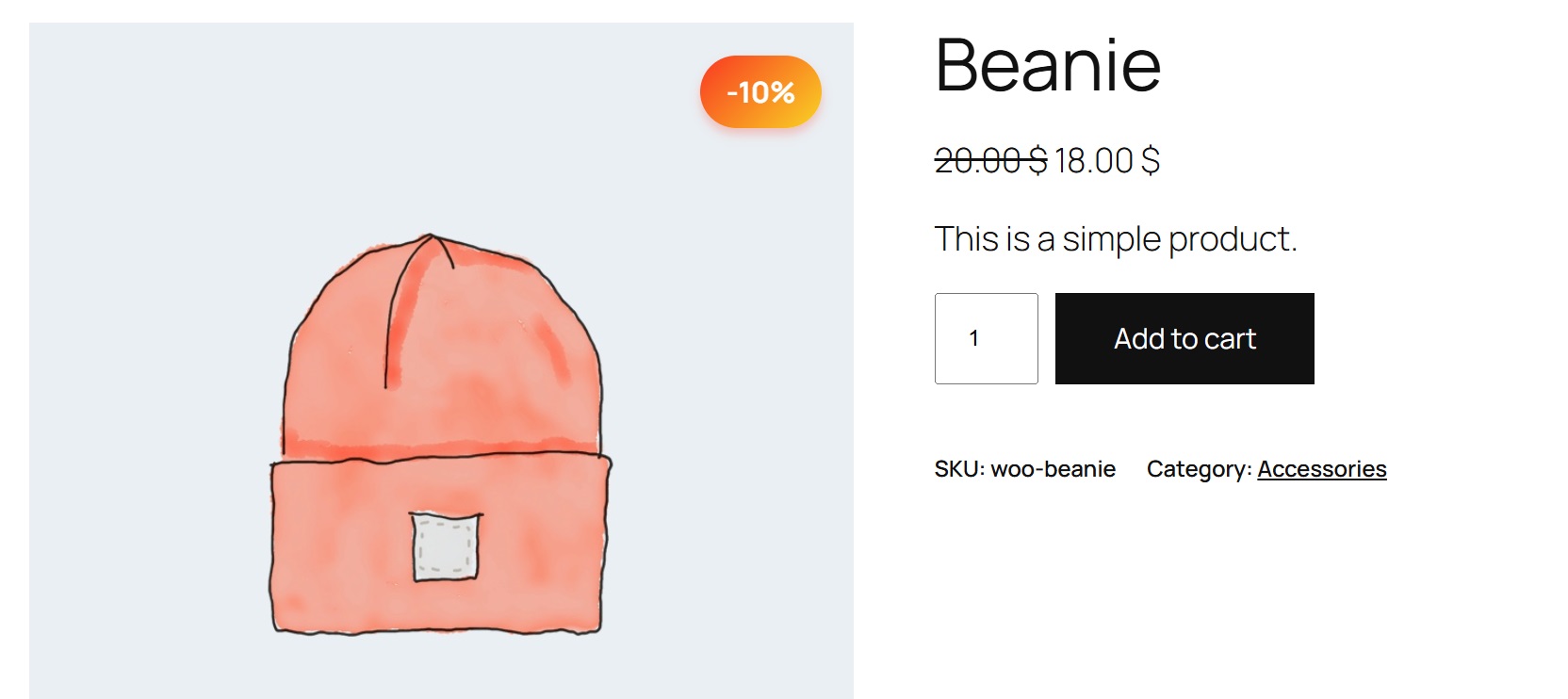
This code snippet replaces WooCommerce’s default “Sale!” badge with a dynamic discount percentage badge that shows customers exactly how much they’re saving. It automatically calculates and displays the discount percentage for both simple and variable products.
What does this code do?
Instead of a generic “Sale!” text, this snippet calculates the actual discount percentage and displays it as an eye-catching badge (e.g., “-25%”). For variable products, it shows the maximum available discount with “Up to” prefix.
Key Features:
- Automatic Calculation: Dynamically calculates discount percentage from regular and sale prices
- Variable Product Support: Shows maximum discount for products with variations
- Multiple Display Options: Show percentage, saved amount, or both
- Smart Detection: Only shows on products that are actually on sale
- Eye-Catching Design: Gradient background with shadow and animations
- Special Emphasis: Products with 50%+ discount get a glowing effect
- Shortcode Included: Display savings info anywhere with [tpsc_product_savings]
Display Options:
- Percentage Only: Shows “-25%” (default)
- Amount Only: Shows “Save $15.00”
- Both: Shows “-25% Save $15.00”
Three Badge Styles Included:
- Gradient Badge (Default): Modern gradient with rounded corners
- Circle Badge: Perfect circle with percentage in center
- Starburst Badge: Star-shaped badge for maximum attention
Smart Features:
- Variable products show “Up to X%” automatically
- High discounts (50%+) trigger special glow animation
- Hover effects for interactivity
- Mobile-optimized sizing
Shortcode Usage:
Use [tpsc_product_savings] in product descriptions to show savings info
Optional parameters: format=”percentage” or format=”amount” or format=”both”
⚠️ Important Warnings
⚠️ Create a backup before modifying functions.php⚠️ This replaces WooCommerce's default sale badge completely
⚠️ Calculation requires both regular price AND sale price to be set
⚠️ Products with no regular price won't show the badge
⚠️ Variable products show the maximum discount available across all variations
⚠️ Some themes may have custom sale badge code that could conflict
⚠️ Currency symbols and formatting follow WooCommerce settings
⚠️ Percentage is rounded to nearest whole number
⚠️ Clear cache after installation if using caching plugins
⚠️ Custom product types might need additional code
/**
 * Display discount percentage badge on WooCommerce products
 * Shows the percentage saved when products are on sale
 * Prefix: tpsc_ (TP Snippet Collection)
 */

// ============================================
// REMOVE DEFAULT SALE BADGE (with high priority)
// ============================================

// Remove the default sale flash completely
add_filter('woocommerce_sale_flash', '__return_empty_string', 999);

// ============================================
// ADD OUR CUSTOM BADGE TO SHOP/ARCHIVE PAGES
// ============================================

// Method 1: Hook into the product thumbnail
add_action('woocommerce_before_shop_loop_item_title', 'tpsc_add_discount_badge_shop', 5);

function tpsc_add_discount_badge_shop() {
    global $product;

    // Check if product is on sale
    if (!$product->is_on_sale()) {
        return;
    }

    $percentage = 0;

    // Calculate discount based on product type
    if ($product->is_type('simple')) {
        $regular_price = (float) $product->get_regular_price();
        $sale_price = (float) $product->get_sale_price();

        if ($regular_price > 0 && $sale_price > 0) {
            $percentage = round(100 - ($sale_price / $regular_price * 100));
        }
    } elseif ($product->is_type('variable')) {
        // For variable products, get the maximum discount
        $max_percentage = 0;

        foreach ($product->get_children() as $child_id) {
            $variation = wc_get_product($child_id);
            if (!$variation || !$variation->is_on_sale()) continue;

            $regular_price = (float) $variation->get_regular_price();
            $sale_price = (float) $variation->get_sale_price();

            if ($regular_price > 0 && $sale_price > 0) {
                $child_percentage = round(100 - ($sale_price / $regular_price * 100));
                if ($child_percentage > $max_percentage) {
                    $max_percentage = $child_percentage;
                }
            }
        }

        $percentage = $max_percentage;
    }

    // Display badge if there's a discount
    if ($percentage > 0) {
        $badge_text = sprintf('-%d%%', $percentage);
        if ($product->is_type('variable')) {
            $badge_text = sprintf('Up to -%d%%', $percentage);
        }

        echo '<span class="tpsc-discount-badge">' . $badge_text . '</span>';
    }
}

// ============================================
// ADD BADGE TO SINGLE PRODUCT PAGES
// ============================================

add_action('woocommerce_before_single_product_summary', 'tpsc_add_discount_badge_single', 15);

function tpsc_add_discount_badge_single() {
    global $product;

    if (!$product->is_on_sale()) {
        return;
    }

    $percentage = 0;

    if ($product->is_type('simple')) {
        $regular_price = (float) $product->get_regular_price();
        $sale_price = (float) $product->get_sale_price();

        if ($regular_price > 0 && $sale_price > 0) {
            $percentage = round(100 - ($sale_price / $regular_price * 100));
        }
    } elseif ($product->is_type('variable')) {
        $max_percentage = 0;

        foreach ($product->get_children() as $child_id) {
            $variation = wc_get_product($child_id);
            if (!$variation || !$variation->is_on_sale()) continue;

            $regular_price = (float) $variation->get_regular_price();
            $sale_price = (float) $variation->get_sale_price();

            if ($regular_price > 0 && $sale_price > 0) {
                $child_percentage = round(100 - ($sale_price / $regular_price * 100));
                if ($child_percentage > $max_percentage) {
                    $max_percentage = $child_percentage;
                }
            }
        }

        $percentage = $max_percentage;
    }

    if ($percentage > 0) {
        $badge_text = sprintf('-%d%%', $percentage);
        if ($product->is_type('variable')) {
            $badge_text = sprintf('Up to -%d%%', $percentage);
        }

        echo '<span class="tpsc-discount-badge tpsc-single-product">' . $badge_text . '</span>';
    }
}

// ============================================
// CSS STYLES - FORCE WITH !IMPORTANT
// ============================================

add_action('wp_head', 'tpsc_discount_badge_css', 999);

function tpsc_discount_badge_css() {
    ?>
    <style>
        /* Make sure product containers are positioned */
        .woocommerce ul.products li.product,
        .woocommerce-page ul.products li.product
		.woocommerce li.product {
            position: relative !important;
        }

        /* Shop/Archive pages badge */
        .woocommerce ul.products li.product .tpsc-discount-badge,
        .woocommerce-page ul.products li.product .tpsc-discount-badge,
		.woocommerce li.product .tpsc-discount-badge {
            position: absolute !important;
            top: 10px !important;
            left: 10px !important;
            background: linear-gradient(135deg, #ff4444 0%, #cc0000 100%) !important;
            color: #ffffff !important;
            padding: 10px 12px !important;
            font-size: 14px !important;
            font-weight: normal !important;
            border-radius: 50px !important;
            z-index: 999 !important;
            box-shadow: 0 2px 8px rgba(0,0,0,0.2) !important;
            text-align: center !important;
            min-width: 50px !important;
            display: inline-block !important;
            line-height: 1 !important;
            text-transform: uppercase !important;
            letter-spacing: 0.5px !important;
        }

        /* Single product page badge */
        .single-product .tpsc-discount-badge.tpsc-single-product {
            position: absolute !important;
            top: 20px !important;
            right: 20px !important;
            background: linear-gradient(135deg, #ff4444 0%, #cc0000 100%) !important;
            color: #ffffff !important;
            padding: 12px 20px !important;
            font-size: 18px !important;
            font-weight: 700 !important;
            border-radius: 50px !important;
            z-index: 999 !important;
            box-shadow: 0 4px 15px rgba(255,0,0,0.3) !important;
        }

        /* Hover effect */
        .tpsc-discount-badge:hover {
            transform: scale(1.05) !important;
            box-shadow: 0 4px 20px rgba(255,0,0,0.4) !important;
        }

        /* Animation */
        .tpsc-discount-badge {
            animation: tpsc-badge-pop 0.5s ease-out !important;
        }

        @keyframes tpsc-badge-pop {
            0% {
                transform: scale(0);
                opacity: 0;
            }
            50% {
                transform: scale(1.1);
            }
            100% {
                transform: scale(1);
                opacity: 1;
            }
        }

        /* High discount emphasis (50% or more) */
        .tpsc-discount-badge[data-discount-high="true"] {
            background: linear-gradient(135deg, #ff0000 0%, #ffaa00 100%) !important;
            animation: tpsc-pulse 2s infinite !important;
        }

        @keyframes tpsc-pulse {
            0%, 100% {
                box-shadow: 0 2px 8px rgba(255,0,0,0.3);
            }
            50% {
                box-shadow: 0 2px 20px rgba(255,0,0,0.6);
            }
        }

        /* Mobile responsive */
        @media (max-width: 768px) {
            .woocommerce ul.products li.product .tpsc-discount-badge,
			.woocommerce li.product .tpsc-discount-badge {
                font-size: 12px !important;
                padding: 6px 10px !important;
                top: 5px !important;
                right: 5px !important;
            }
        }

        /* Hide any default sale badges that might still appear */
        .woocommerce span.onsale,
        .woocommerce-page span.onsale,
        .woocommerce ul.products li.product .onsale,
        .woocommerce-page ul.products li.product .onsale {
            display: none !important;
        }
    </style>
    <?php
}

// ============================================
// BACKUP METHOD - JavaScript injection
// ============================================

add_action('wp_footer', 'tpsc_discount_badge_js');

function tpsc_discount_badge_js() {
    if (!is_shop() && !is_product_category() && !is_product_tag()) {
        return;
    }
    ?>
    <script>
    document.addEventListener('DOMContentLoaded', function() {
        // Check if badges are visible, if not, try to add them via JS
        setTimeout(function() {
            const products = document.querySelectorAll('.woocommerce ul.products li.product');
            products.forEach(function(product) {
                // Check if badge already exists
                if (!product.querySelector('.tpsc-discount-badge')) {
                    // Check for sale price elements
                    const priceHtml = product.querySelector('.price');
                    if (priceHtml && priceHtml.querySelector('del') && priceHtml.querySelector('ins')) {
                        // Calculate discount
                        const regularPrice = parseFloat(priceHtml.querySelector('del').textContent.replace(/[^0-9.,]/g, '').replace(',', '.'));
                        const salePrice = parseFloat(priceHtml.querySelector('ins').textContent.replace(/[^0-9.,]/g, '').replace(',', '.'));

                        if (regularPrice > 0 && salePrice > 0) {
                            const percentage = Math.round(100 - (salePrice / regularPrice * 100));
                            if (percentage > 0) {
                                // Create and add badge
                                const badge = document.createElement('span');
                                badge.className = 'tpsc-discount-badge';
                                badge.textContent = '-' + percentage + '%';

                                // Find the best place to insert
                                const imageWrapper = product.querySelector('.woocommerce-loop-product__link, .woocommerce-LoopProduct-link, a.product-image, a img');
                                if (imageWrapper) {
                                    product.style.position = 'relative';
                                    product.insertBefore(badge, product.firstChild);
                                }
                            }
                        }
                    }
                }
            });
        }, 100);
    });
    </script>
    <?php
}
📝 Installation Instructions
BASIC INSTALLATION:1. Copy the entire code block
2. Navigate to WordPress Admin → Appearance → Theme Editor → functions.php
3. Paste at the bottom of the file (or use Code Snippets plugin)
4. Save changes
5. Sale badges will automatically update
TO CHANGE DISPLAY TYPE:
By default, it shows percentage only (-25%)
To show saved amount instead:
1. Find this line: $display_type = apply_filters('tpsc_discount_display_type', 'percentage');
2. Change 'percentage' to 'amount' for monetary value
3. Change 'percentage' to 'both' for both percentage and amount
TO CHANGE BADGE STYLE:
Three styles are included in the CSS:
1. Default: Gradient rounded badge
2. Circle: Comment out default style, uncomment "Alternative Style 1"
3. Starburst: Comment out default style, uncomment "Alternative Style 2"
TO CUSTOMIZE COLORS:
Default gradient: #f93822 to #f9d423 (red to yellow)
Find these hex codes in the CSS and replace with your colors
High discount glow: #ff0844 to #ffb700 (appears on 50%+ discounts)
TO MODIFY TEXT FORMAT:
Find these lines in the code:
- sprintf(__('-%d%%', 'woocommerce'), $percentage)
- sprintf(__('Save %s', 'woocommerce'), wc_price($saved_amount))
Modify the text structure as needed
USING THE SHORTCODE:
Add to any product page or description:
[tpsc_product_savings] - Shows both amount and percentage
[tpsc_product_savings format="percentage"] - Shows only percentage
[tpsc_product_savings format="amount"] - Shows only amount saved
ADVANCED CUSTOMIZATION:
To change when glow effect appears (default 50%+):
Modify the CSS selector that contains "-5", "-6", "-7", "-8", "-9"
TESTING:
1. Set a product on sale with both regular and sale price
2. Visit shop page to see percentage badge
3. Try different discount amounts to see the glow effect on 50%+ discounts
4. Test with variable products to see "Up to X%" display
📸 Screenshots
💬 Let's Connect and Share!
Got a question about this snippet?
Something not working as expected? Need help customizing it for your specific needs?
Want to request a custom snippet?
Have an idea for functionality you're missing on your site? Tell us what you're looking for!
Have an awesome snippet you're using?
Share it with us! Our community loves learning and growing together.
No comments yet.